Installation and configuration
Platform-specific SDK packages
The SDK is distributed in different formats depending on the target platform.
| Platform | Distribution format |
|---|---|
Windows, Android |
|
Linux |
|
macOS, iOS |
|
.NET |
NuGet packages ( |
Installation steps
Toolkit Content
The IRISOCR™ SDK package contains the following folders and subfolders:
| Folder | Windows | Linux | macOS | Android | iOS |
|---|---|---|---|---|---|
Welcome page |
Gateway to documentation |
||||
bin |
Samples and utility binaries |
Samples and utility binaries |
SDK framework + utilities + C wrapper (.dll and .xml) |
Precompiled samples (empty now) |
SDK framework |
include |
Header files |
Header files |
Header files |
||
include_c |
C headers |
C headers |
C headers |
||
lib |
|
|
|
||
redist |
Visual Studio redistributables (VS2022) |
||||
resources |
All resources needed for characters recognition, such as lexicons and fonts dictionaries. |
||||
samples |
C, C++, C# examples |
C, C++, C# examples |
C, C++, C# examples |
SmartCapture |
SmartCapture |
work |
Images for testing purposes |
||||
|
List of files that are contained in the bin subfolder
Windows
| File Type | File name | Description |
|---|---|---|
Libraries |
idrsbarcode16.dll |
Main Barcode engine |
idrsbarcodeevoi.dll |
Auxiliary barcode engine |
|
idrsbarcodeext16.dll |
QR code engine |
|
idrsdmtx16.dll |
Support for datamatrix barcodes |
|
idrsdocout16.dll |
Document output library |
|
idrskrn16.dll |
iDRS™ main library |
|
idrsnetframework16.dll |
.NET Framework API assembly |
|
idrsnetframework16.xml |
.NET Framework API documentation |
|
idrsocr16.dll |
OCR/ICR kernel |
|
idrsimp16.dll |
Camera image preprocessing library |
|
idrsprepro16.dll |
Image preprocessing library |
|
idrstiff16.dll |
Tiff library |
|
idrszlib16.dll |
Zlib library |
|
idrsjpeg2k16.dll |
Wavelet compression library |
|
idrsjbig216.dll |
Symbol compression library |
|
idrsjpeg16.dll |
Jpeg encoding library |
|
idrspng16.dll |
PNG encoding library |
|
idrsc16.dll |
C API runtime |
|
idrsnet16.dll |
.NET API assembly |
|
idrsnet16.xml |
.NET API documentation |
|
Sample Applications |
CppBarcode16.exe |
This sample application demonstrates the barcode recognition features. This sample is built using the C++ API. The source code can be found in <IDRS_SDK_ROOT>/samples/cpp/Barcode. |
CppImage2Html16.exe |
This sample application shows how to convert an image to html text. This sample is built using the C++ API. The source code can be found in <IDRS_SDK_ROOT>/samples/cpp/Image2Html |
|
CImage2Html16.exe |
This sample application shows how to convert an image to html text. This sample is built using the C API. The source code can be found in <IDRS_SDK_ROOT>samples/c/Image2Html |
|
CppReader16.exe |
This sample application demonstrates the character recognition and the document output features. This sample is built using the C++ API. The source code can be found in <IDRS_SDK_ROOT>/samples/cpp/Reader |
|
CsBarcode16.exe |
This sample application demonstrates the barcode recognition features. This sample is built using the .NET API. The source code can be found in <IDRS_SDK_ROOT>/samples/dotnet/Barcode |
|
CsImage2Html16.exe |
This sample application shows how to convert an image to html text. his sample is built using the .NET API. The source code can be found in <IDRS_SDK_ROOT>/samples/dotnet/Image2Html |
|
CsReader16.exe |
This sample application demonstrates the character recognition and the document output features. This sample is built using the .NET API. The source code can be found in <IDRS_SDK_ROOT>/samples/dotnet/Reader |
macOS
| File Type | File name | Description |
|---|---|---|
bin/Framework |
iDRS16.framework |
iDRS™ framework |
bin |
libidrsc16.dylib |
C API runtime |
idrsnet16.dll |
.NET API assembly |
|
idrsnet16.xml |
.NET API assembly documentation |
|
Sample Applications |
CppBarcode16 |
This sample application demonstrates the barcode recognition features. This sample is built using the C++ API. The source code can be found in <IDRS_SDK_ROOT>/samples/cpp/Barcode. |
CppImage2Html16 |
This sample application shows how to convert an image to html text. This sample is built using the C++ API. The source code can be found in <IDRS_SDK_ROOT>/samples/cpp/Image2Html |
|
CppReader16 |
This sample application demonstrates the character recognition and the document output features. This sample is built using the C++ API. The source code can be found in <IDRS_SDK_ROOT>/samples/cpp/Reader |
|
CImage2Html16 |
This sample application shows how to convert an image to html text. This sample is built using the C API. The source code can be found in <IDRS_SDK_ROOT>samples/c/Image2Html |
|
CsBarcode16 |
This sample application demonstrates the iDRS™ barcode recognition features. This sample is built using the .NET API. The source code can be found in <IDRS_SDK_ROOT>/samples/dotnet/Barcode |
|
CsImage2Html16 |
This sample application shows how to convert an image to html text. his sample is built using the .NET API. The source code can be found in <IDRS_SDK_ROOT>/samples/dotnet/Image2Html |
|
CsReader16 |
This sample application demonstrates the character recognition and the document output features. This sample is built using the .NET API. The source code can be found in <IDRS_SDK_ROOT>/samples/dotnet/Reader |
Linux
| File Type | File name | Description |
|---|---|---|
Utility Programs |
linux_install_idrs.sh |
Shell script used to create symbolic links for the files needed by the SDK. |
Sample Applications |
CppBarcode16 |
This sample application demonstrates the barcode recognition features. This sample is built using the C++ API. The source code can be found in <IDRS_SDK_ROOT>/samples/cpp/Barcode. |
CppImage2Html16 |
This sample application shows how to convert an image to html text. This sample is built using the C++ API. The source code can be found in <IDRS_SDK_ROOT>/samples/cpp/Image2Html |
|
CppReader16 |
This sample application demonstrates the character recognition and the document output features. This sample is built using the C++ API. The source code can be found in <IDRS_SDK_ROOT>/samples/cpp/Reader |
|
CImage2Html16 |
This sample application shows how to convert an image to html text. This sample is built using the C API. The source code can be found in <IDRS_SDK_ROOT>samples/c/Image2Html |
|
CsBarcode16 |
This sample application demonstrates the barcode recognition features. This sample is built using the .NET API. The source code can be found in <IDRS_SDK_ROOT>/samples/dotnet/Barcode |
|
CsImage2Html16 |
This sample application shows how to convert an image to html text. his sample is built using the .NET API. The source code can be found in <IDRS_SDK_ROOT>/samples/dotnet/Image2Html |
|
CsReader16 |
This sample application demonstrates the character recognition and the document output features. This sample is built using the .NET API. The source code can be found in <IDRS_SDK_ROOT>/samples/dotnet/Reader |
In the lib subfolder, you can also find:
-
libidrsc16.so.version: C API runtime
-
idrsnet16.dll: .NET API assembly
-
idrsnet16.xml: .NET API assembly documentation
Environment setup
You need to establish the correct environment before using the toolkit.
The distribution package contains the full versioned library names for which symbolic links need to be created in the correct place. The package contains a utility shell script that takes care of creating all the necessary symbolic links for you.
In order to invoke the shell script, follow these instructions:
-
Open a terminal window and go to the path where you unpacked the tar.bz2 archive containing the package.
-
Go to the bin folder
-
Execute
sh linux_install_idrs.sh
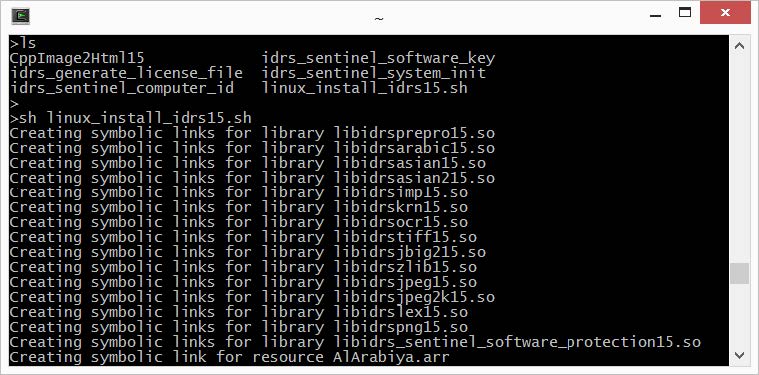
After creating the necessary symbolic links, you need to set the LD_LIBRARY_PATH environment variable to point to the lib folder.
Run the following command:
export LD_LIBRARY_PATH=$LD_LIBRARY_PATH:<path_to_iDRS_package>/lib/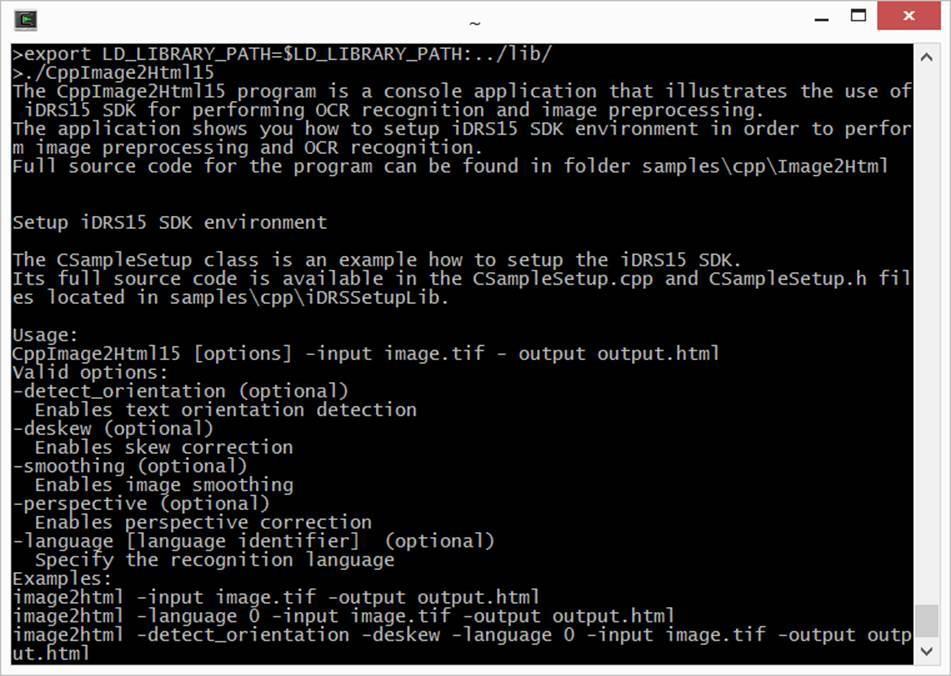
| You can add the above command to your .bash_profile not to repeat it each time you launch a new terminal window. |
You are now able to use the toolkit.
You can launch the sample application CppImage2Html16 to test that everything works fine.
Android
Host setup
To build Android applications using the IRISOCR™ SDK, make sure that the following elements are installed on the host computer:
-
Android SDK
The toolkit is compatible with Android 4.2.2 (API 17) or higher. At least one API must be installed. -
Android NDK
As the IRISOCR™ SDK consists in native libraries, you need to have the Android NDK (Native Development Kit) available on your host computer.No path with spacesKnown issue with the Android NDK: compilation may fail if the path to the installed NDK package contains spaces! -
Android Studio
The official IDE for Android development is Android Studio. Of course, alternatives do exist and may be used instead.
-
SDK version or target SDK version must be at least Android API 17.
-
Android guidelines say native libraries of an Android application should link against shared C++ runtime, and all libraries should use the same runtime (see https://developer.android.com/ndk/guides/cpp-support.html) . The IRISOCR™ SDK follows that directive.
NuGet distribution
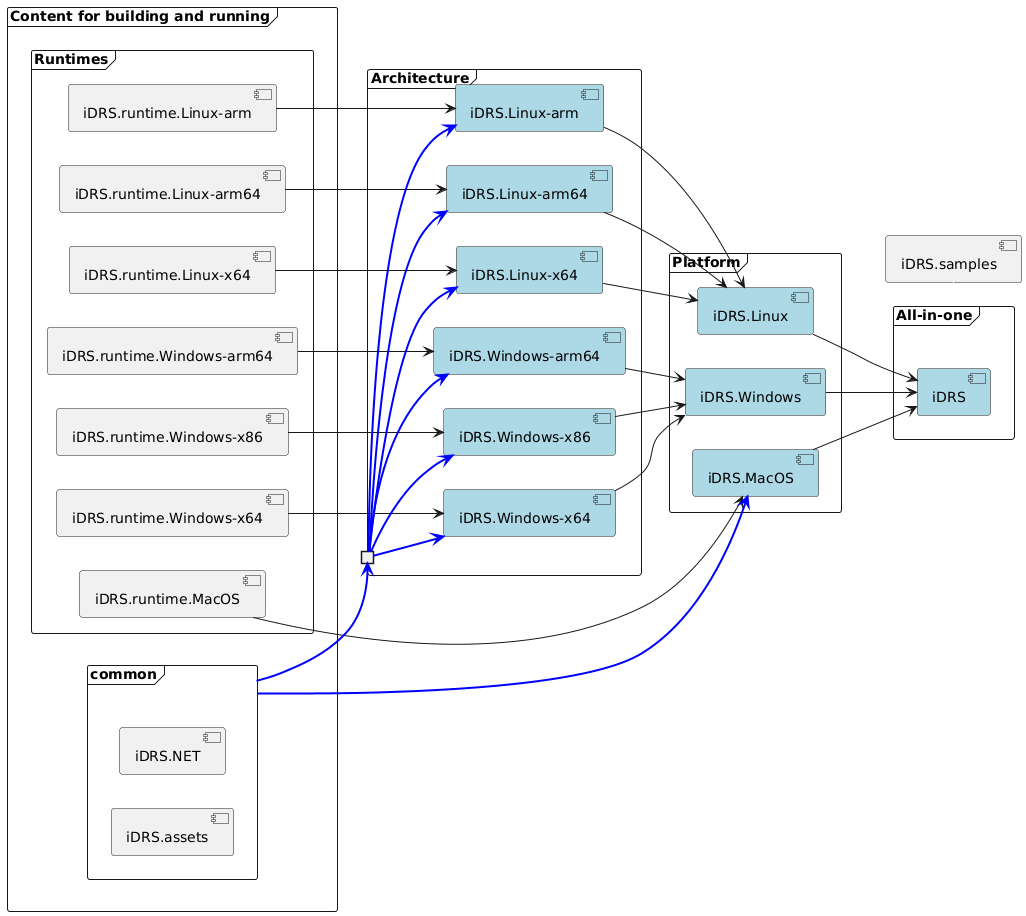
The NuGet distribution comprises the following packages (.nupkg):
-
All-in-one packages:
This package automatically downloads all the components required to use iDRS on any supported operating system and architecture:-
iDRS
-
-
Platform packages:
These packages automatically download all components needed to use iDRS on a specific operating system, regardless of architecture:-
iDRS.macOS
-
iDRS.Windows
-
iDRS.Linux
-
-
Architecture packages:
These packages download the components required to use iDRS on a specific operating system and architecture:-
iDRS.Windows-x86
-
iDRS.Windows-x64
-
iDRS.Windows-arm64
-
iDRS.Linux-x64
-
iDRS.Linux-arm64
-
iDRS.Linux-arm
-
-
Low-level packages:
These packages are downloaded automatically when using a platform or architecture package. They can also be referenced directly when additional flexibility or fined-grained control is required:-
iDRS.assets – Resources files required to perform OCR.
-
iDRS.NET – The .NET assemblies.
-
iDRS.runtime-\<platform-arch\> – Native libraries for each supported platform and architecture.
-
An image is worth a thousand words: