Adding custom metadata to PDF documents
Code Snippets
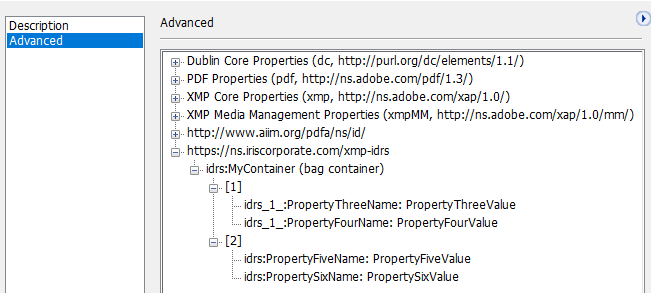
The simplest way to create custom metadata is to create a list of properties and attach it to the main container.
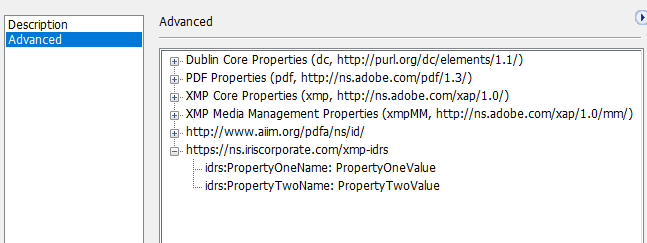
1. Creating a simple list of name:value properties
// Create an IDRS object
CIDRS objIdrs = CIDRS::Create();

// Load the source image
CImageIO objImageIO = CImageIO::Create(objIdrs);
CPage objPage = objImageIO.LoadPage("path/to/image");

// Setup and launch OCR
CTextRecognition objTextRecognition = CTextRecognition::Create(objIdrs);
objTextRecognition.RecognizeText(objPage);

// Create the properties
CPdfCustomMetadataProperty objPropertyOne = CPdfCustomMetadataProperty::Create(
	"PropertyOneName",
	"PropertyOneValue");
CPdfCustomMetadataProperty objPropertyTwo = CPdfCustomMetadataProperty::Create(
	"PropertyTwoName",
	"PropertyTwoValue");
CPdfCustomMetadataProperty objPropertyThree = CPdfCustomMetadataProperty::Create(
	"PropertyThreeName",
	"PropertyThreeValue");
CPdfCustomMetadataProperty objPropertyFour = CPdfCustomMetadataProperty::Create(
	"PropertyFourName",
	"PropertyFourValue");

// Create property list with custom namespace
CPdfCustomMetadataPropertyList objCustomMetadataPropertyListWithNS = CPdfCustomMetadataPropertyList::Create();
objCustomMetadataPropertyListWithNS.AddProperty(objPropertyOne);
objCustomMetadataPropertyListWithNS.AddProperty(objPropertyTwo);

CPdfCustomMetadataPropertyList objCustomMetadataPropertyListWithNS2 = CPdfCustomMetadataPropertyList::Create();
objCustomMetadataPropertyListWithNS2.AddProperty(objPropertyThree);
objCustomMetadataPropertyListWithNS2.AddProperty(objPropertyFour);

// Create metadata object and add the list property
CPdfCustomMetadata objPdfCustomMetadata = CPdfCustomMetadata::Create();
objPdfCustomMetadata.Add(objCustomMetadataPropertyListWithNS);
objPdfCustomMetadata.Add(objCustomMetadataPropertyListWithNS2);

// Create pdf output parameter object and set the custom metadata
CPdfOutputParams objPdfOutputParams = CPdfOutputParams::Create(
	PdfVersion::Pdf17,
	PageDisplay::TextAndGraphics);

objPdfOutputParams.SetPdfCustomMetadata(objPdfCustomMetadata);

// Create a DocumentWriter object and save the document
CDocumentWriter objDocumentWriter = CDocumentWriter::Create(objIdrs);
objDocumentWriter.SetOutputParams(objPdfOutputParams);
objDocumentWriter.Save("Path to the output.pdf", &objPage, 1);
// Create an IDRS object
using (CIDRS objIdrs = new CIDRS())
{
// Create a page object and load the source image
using (CImageIO objImageIO = new CImageIO(objIdrs))
using (CPage objPage = objImageIO.LoadPage("myimage"))
{
// Setup and launch OCR
using (CTextRecognition objTextRecognition = new CTextRecognition(objIdrs))
{
objTextRecognition.RecognizeText(objPage);
// Create the properties
CPdfCustomMetadataProperty objPropertyOne = new CPdfCustomMetadataProperty(
"PropertyOneName",
"PropertyOneValue");
CPdfCustomMetadataProperty objPropertyTwo = new CPdfCustomMetadataProperty(
"PropertyTwoName",
"PropertyTwoValue");
CPdfCustomMetadataProperty objPropertyThree = new CPdfCustomMetadataProperty(
"PropertyThreeName",
"PropertyThreeValue");
CPdfCustomMetadataProperty objPropertyFour = new CPdfCustomMetadataProperty(
"PropertyFourName",
"PropertyFourValue");
// Create property list with custom namespace
CPdfCustomMetadataPropertyList objCustomMetadataPropertyListWithNS = new CPdfCustomMetadataPropertyList();
objCustomMetadataPropertyListWithNS.AddProperty(objPropertyOne);
objCustomMetadataPropertyListWithNS.AddProperty(objPropertyTwo);
CPdfCustomMetadataPropertyList objCustomMetadataPropertyListWithNS2 = new CPdfCustomMetadataPropertyList();
objCustomMetadataPropertyListWithNS2.AddProperty(objPropertyThree);
objCustomMetadataPropertyListWithNS2.AddProperty(objPropertyFour);
// Create metadata object and add the list property
using (CPdfCustomMetadata objPdfCustomMetadata = new CPdfCustomMetadata())
{
objPdfCustomMetadata.Add(objCustomMetadataPropertyListWithNS);
objPdfCustomMetadata.Add(objCustomMetadataPropertyListWithNS2);
// Create pdf output parameter object and set the custom metadata
using (CPdfOutputParams objPdfOutputParams = new CPdfOutputParams(
PdfVersion.Pdf17,
PageDisplay.TextAndGraphics))
{
// Create a DocumentWriter object and save the document
using (CDocumentWriter objDocumentWriter = new CDocumentWriter(objIdrs))
{
objDocumentWriter.OutputParams = objPdfOutputParams;
objPdfOutputParams.PdfCustomMetadata = objPdfCustomMetadata;
objDocumentWriter.Save("Path to the output.pdf", new List<CPage>() { objPage }.ToArray());
}
}
}
}
}
}Will produce this output
2. Creating bag containers (Bag containers can gather lists of properties)
// Create an IDRS object
CIDRS objIdrs = CIDRS::Create ();
// Create a page object and load the source image
CImage objImage = CImage::Create(objIdrs, idrs_t("Path to image to load"))
CPage objPage = CPage::Create (objImage);

// Launch OCR
CTextRecognition objTextRecognition = CTextRecognition::Create (objIdrs);
objTextRecognition.RecognizeText (objPage);

// Create the properties
CPdfCustomMetadataProperty objPropertyOne = CPdfCustomMetadataProperty::Create (
	"PropertyOneName",
	"PropertyOneValue");
CPdfCustomMetadataProperty objPropertyTwo = CPdfCustomMetadataProperty::Create (
	"PropertyTwoName",
	"PropertyTwoValue");
CPdfCustomMetadataProperty objPropertyThree = CPdfCustomMetadataProperty::Create (
	"PropertyThreeName",
	"PropertyThreeValue");
CPdfCustomMetadataProperty objPropertyFour = CPdfCustomMetadataProperty::Create (
	"PropertyFourName",
	"PropertyFourValue");

// Create property list with custom namespace
CPdfCustomMetadataPropertyList objCustomMetadataPropertyListWithNS = CPdfCustomMetadataPropertyList::Create ();
objCustomMetadataPropertyListWithNS.AddProperty (objPropertyOne);
objCustomMetadataPropertyListWithNS.AddProperty (objPropertyTwo);

CPdfCustomMetadataPropertyList objCustomMetadataPropertyListWithNS2 = CPdfCustomMetadataPropertyList::Create ();
objCustomMetadataPropertyListWithNS2.AddProperty (objPropertyThree);
objCustomMetadataPropertyListWithNS2.AddProperty (objPropertyFour);

// Create a bag container, append the property lists to it.
CPdfCustomMetadataContainer objPdfCustomMetadataContainer = CPdfCustomMetadataContainer::Create ("MyContainer");
objPdfCustomMetadataContainer.Add (objCustomMetadataPropertyListWithNS);
objPdfCustomMetadataContainer.Add (objCustomMetadataPropertyListWithNS2);

// Create metadata object and add the list property
CPdfCustomMetadata objPdfCustomMetadata = CPdfCustomMetadata::Create ();
objPdfCustomMetadata.Add (objPdfCustomMetadataContainer);

// Create pdf output parameter object and set the custom metadata
CPdfOutputParams objPdfOutputParams = CPdfOutputParams::Create (
	PdfVersion::Pdf17,
	PageDisplay::TextAndGraphics);


// Create a DocumentOutput object and save the document
CDocumentWriter objDocumentWriter = CDocumentWriter::Create (objIdrs);
objDocumentWriter.SetOutputParams(objPdfOutputParams);

objPdfOutputParams.SetPdfCustomMetadata (objPdfCustomMetadata);
objDocumentWriter.Save ( idrs_t ("Path to the output.pdf"), &objPage,1);
// Create an IDRS object
using (CIDRS objIdrs = new CIDRS())
{
// Create a page object and load the source image
using (CImageIO objImageIO = new CImageIO(objIdrs))
using (CPage objPage = objImageIO.LoadPage("myimage"))
{
// Setup and launch OCR
using (CTextRecognition objTextRecognition = new CTextRecognition(objIdrs))
{
objTextRecognition.RecognizeText(objPage);
// Create the properties
CPdfCustomMetadataProperty objPropertyOne = new CPdfCustomMetadataProperty(
"PropertyOneName",
"PropertyOneValue");
CPdfCustomMetadataProperty objPropertyTwo = new CPdfCustomMetadataProperty(
"PropertyTwoName",
"PropertyTwoValue");
CPdfCustomMetadataProperty objPropertyThree = new CPdfCustomMetadataProperty(
"PropertyThreeName",
"PropertyThreeValue");
CPdfCustomMetadataProperty objPropertyFour = new CPdfCustomMetadataProperty(
"PropertyFourName",
"PropertyFourValue");
// Create property list with custom namespace
CPdfCustomMetadataPropertyList objCustomMetadataPropertyListWithNS = new CPdfCustomMetadataPropertyList();
objCustomMetadataPropertyListWithNS.AddProperty(objPropertyOne);
objCustomMetadataPropertyListWithNS.AddProperty(objPropertyTwo);
CPdfCustomMetadataPropertyList objCustomMetadataPropertyListWithNS2 = new CPdfCustomMetadataPropertyList();
objCustomMetadataPropertyListWithNS2.AddProperty(objPropertyThree);
objCustomMetadataPropertyListWithNS2.AddProperty(objPropertyFour);
// Create metadata object and add the list property
using (CPdfCustomMetadata objPdfCustomMetadata = new CPdfCustomMetadata())
{
objPdfCustomMetadata.Add(objCustomMetadataPropertyListWithNS);
objPdfCustomMetadata.Add(objCustomMetadataPropertyListWithNS2);
// Create pdf output parameter object and set the custom metadata
using (CPdfOutputParams objPdfOutputParams = new CPdfOutputParams(
PdfVersion.Pdf17,
PageDisplay.TextAndGraphics))
{
// Create a DocumentWriter object and save the document
using (CDocumentWriter objDocumentWriter = new CDocumentWriter(objIdrs))
{
objDocumentWriter.OutputParams = objPdfOutputParams;
objPdfOutputParams.PdfCustomMetadata = objPdfCustomMetadata;
objDocumentWriter.Save("Path to the output.pdf", new List<CPage>() { objPage }.ToArray());
}
}
}
}
}
}Will produce this output